HIRO User Guides

HostIsDown = ["192.168.1.100","192.168.1.101","192.168.1.102"]Table of Contents
Variable Introduction
|
Variable names are limited by the underlying tokenizer to contain:
|
HIRO variables are largely defined by the users. Variables are designed to be reused throughout the entire HIRO installation. Defined variables are stored in the database and are available for (re)use for all users. Typically (with the exception of temporary/local variables) each variable is defined during initial creation to contain a specific type of data e.g.:
| Variable | Description | Content | Example |
|---|---|---|---|
IPv4Address |
Contains an IPv4 address. |
IPv4 address as string. |
192.168.0.1, |
Interface |
Contains a Network interface name. |
Interface name as string. |
eth0, |
|
Variable definitions are immutable once defined, therefore great care should be taken when defining new variables. This should be a process involving key staff from all groups of HIRO users. Customers can and should define their best practice naming and definition standards for HIRO variables during the initial rollout process. |
| Make sure to define all variables you wish to use before their first occurrence in an Issue. |
Todo Variables
Each Issue must contain at least one "Todo"-Variable otherwise it will automatically be marked as "resolved" without any actual processing. The user can define variables with a special "Todo" flag that are exclusively used to track progress. HIRO will use "Todo"-Variables to track if a task has been completed. Issues will remain in processing until all values from all "Todo" variables in this Issue have been removed.
The user can create a variable HostIsDown to which a list of hostnames
that should be reachable is stored. The variable can contain a list of
values like:
Now a set of Knowledge Items are triggered by the existence of
HostIsDown and start taking measures to restore service for these
hostnames. Once they are confirmed to be available again the respective
hostname is deleted from the list of values in HostIsDown. Once all
"Todo"-Variables have been emptied, the Issue is considered to be
finished and will be "resolved". As long as there are any values present
in any of the "Todo"-Variables, the Issue will remain in processing
until Knowledge Items have removed all values, the Issue was resolved
manually or ejected by other means.
Special Variables
There are a few variables that have special meaning and contain information about the issue processing.
| Variable | Description |
|---|---|
ogit/_id |
The graph ID of the vertex, often referred to as "issue ID" |
ogit/_created-on |
Timestamp of issue creation in ms since epoch |
ogit/_modified-on |
Timestamp of last issue modification in ms since epoch |
ogit/subject |
Human readable issue subject shown in frontend UI |
ogit/status |
Current state of the issue |
ogit/Automation/originNode |
ID of the vertex the issue was originally created on |
ogit/Automation/processingNode |
ID of the vertex the issue is currently attached to |
ogit/Automation/processingTimestamp |
Timestamp value of the last processed KI (ms). It is updated with each KI execution and displayed in the task content |
ogit/Automation/deployStatus |
Deployment status of issue in engine |
With the exception of ogit/subject, these variables should be regarded as "read-only" for KI processing.
[[Self-generated Variables]] === Self-generated Variables
These are variables that are self-generated in the moment that one of the components: Issue, Node or KI exists.
IID – it is ogit/_id of an Issue that comes into HIRO
NodeID – it is ogit/_id of a vertex/Node from the semantic graph
KIID – It is ogit/_id of a KI
These values are auto imported and explicit matching in conditions.
do
  Taskid = IID
Virtual Variables
There are variables that will be available only within KI processing context and are not actually stored or visible in the graph representation of the issue.
ExecIdle
| Variable | Description |
|---|---|
ExecIdle |
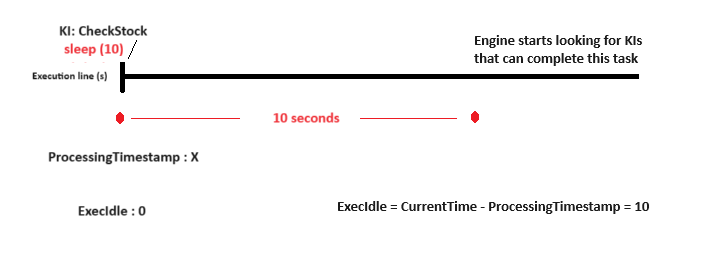
Seconds since last KI execution. It is dinamically calculated from the ´ogit/Automation/processingTimestamp´ |
A simple example that would make use of the ExecIdle variable to trigger a KI only after no other KI could be executed for about 5 minutes (only minimal WHEN and DO sections shown):
when
  ExecIdle > 300
do
  log("Issue has been idle for 5 minutes")
Let’s illustrate the relationship between ExecIdle and processingTimestamp using the Sleep function. The Sleep function pauses the engine from searching KIs for 10 seconds. During this pause, ExecIdle will be 0 with the last KI execution and will increase over time. Meanwhile, ogit/Automation/processingTimestamp will store the timestamp of the last executed KI. After the 10-second pause, ExecIdle will be 10, and the task will resume, searching for KIs that can complete it.