 HIRO User Guides

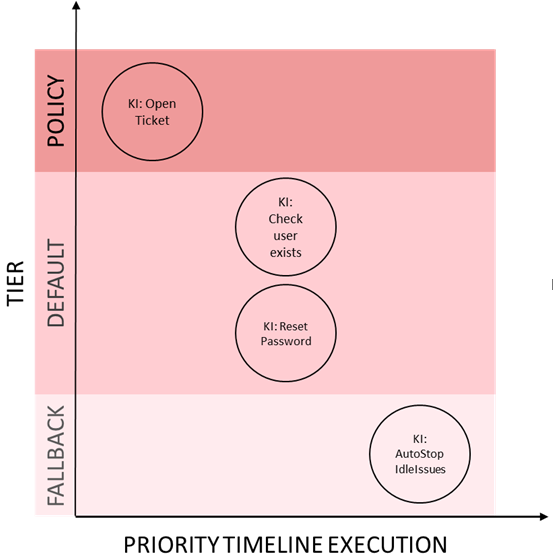
Table of Contents
Introduction
Knowledge Items use a YAML-like syntax and are constructed using five major sections. The following document will introduce you to each section and how it is used.
Sections
|
Mandatory elements for all KI are: |
Every Knowledge Item is build with these sections:
| Section | Description |
|---|---|
|
Meta information about the KI, like |
|
Specifies on which node the knowledge will be applied and which conditions should exist on the node |
|
Specifies which conditions should exist on the issue to execute the KI |
|
Commands to execute in the case of issue binding |
ki
-
name- KI Name (if KIs are saved to the filesystem, this name should be the same as the filename) -
description- KI description -
version- (Mandatory Attribute), defines the version of the KI. Proposed form is:1@author(this should allow to modify the KI in a distributed environment by different people, but still allows easier update later. For example, if the author doesn’t change, then1@Fooshould be updated to2@Foo, but2@Fooand3@Barwould be in conflict, needing manual resolving) -
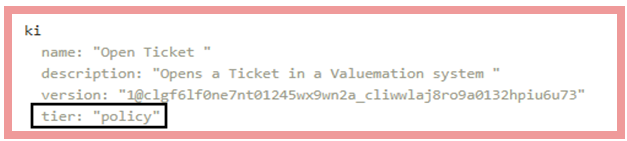
tier- Optional attribute to indicate execution tier the KI belongs to ("default", "policy" or "fallback")
KI Tiers
KIs can be assigned to one of three priority tiers which will affect KI selection priority.
default |
the normal KI priority which should be used for almost all normal KIs |
policy |
the policy level will guarantee execution before KIs of the other tiers |
fallback |
KIs in this tier will only ever be executed when not default or policy KIs are matching |
KI tiers are only applied on a vertex local scope, so a matching "fallback" KI on the current processing vertex will be executed before the issue is routed to a "policy" KI on a connected remote vertex.
If the tier is not specified in the KI, it defaults to "Default" policy. To assign either of the other two values, you must include the tier attribute with the corresponding value in the KI header.
Imagine you have as ToDos "OpenTicket", "CheckUserExists" and "ResetPassword". Among these three Actions, OpenTicket is designated as the initial step to ensure that subsequent results can be reported to the ticketing system for documentation purposes. To prioritize OpenTicket as the first action, we use the tier feature. OpenTicket is a KI that must always be executed first amongst others, to ensure that subsequent steps can be accurately reported to the ticketing system for documentation purposes.
The tier must be explicitly stated in the KI header; if left unspecified, the default value for the tier is used.
| Only use "policy" and "fallback" tiers for rare cases where guaranteed prioritized or "last resort" execution is absolutely essential. |
ki Section Example
ki
  name: "Tutorial test KI"
  version: "1@Author"
  description: "Tutorial test KI to describe KI Syntax 6.0"
  tier: "default"
on
This section defines where the KI is "bound" meaning a definition of filter elements that specify environment conditions according to the MARS-Model Node data. It could look something like:
on Section Example
on
  NodeType    # exists
  not NodeFoo # not exists
  (NodeType == "Machine")
  OSName =~ "(SLES|Centos)"
  (OSVersion > "7") and (OSVersion < "10") # or OSVersion in 7..10 ?
  with Type@in as ParentScope
    (NodeType == "Resource") or (NodeType == "Software")
    MonitoringEnabled
  end
Related Node Matching
This subsection provides an additional restriction to the vertices on which ki will be applied. Namely, the vertex which is matched by the regular conditions in on section must additionally be connected to another vertex of type <vertexType> by an connection of type <edgeType> in direction edgeDirection. The <edgeType> can be omitted which would accept any edge type:
Related Node Matching Syntax Template
with <vertexType>@<edgeDirection>[:<edgeType>]
  <Conditions>
end
where <edgeDirection> can have the following values: in, out, or connected.
It specifies direction of the edge between vertices, can be incoming (in:←), outgoing (out:→) or connected (-). The last one means that condition with is true for any edge direction (in or out), it just checks if edge exists.
Related Node Matching Syntax Example
on
  ogit/_type == "ogit/Person"
  with ogit/Software/Application@out:ogit/uses
    ogit/name == "LunchApp"
    ogit/url
  end
That way KI will execute on every vertex of type "ogit/Person" having an outgoing edge of type ogit/uses to a
vertex of type ogit/Software/Application which must satisfy the following conditions:
-
ogit/nameattribute has value "LunchApp" -
attribute
ogit/urlexists
when
The instructions defined in do will only be executed when all conditions
of when section are matched.
when Section Example
when
  VarA
  VarB["key"] # match on key
  VarC[VarA] == NodeType
  list VarD
  VarF as Test
  MonitoringStatus@any == "true"
do
Once all conditions are matched the Knowledge Item will be applied. The
do section defines which actions are performed. It might look like this:
do Section Example
  log.info("bind ki and execute do")
  VarB["new_key"] = 1
  add(NewVar["key"] = "1")
  delete(VarA)
  stdout: ExecuteOutput, exit: LOCAL::Error = execute("path/to/script", timeout: 60)
  if Error then
    log.error("command returned with non-zero exit code")
  else
    log("execute returned ${ExecuteOutput}")
  end
Logical Branching
|
Designing Knowledge Items with As a rule of thumb: Deciding between variants of a log message is acceptable. Making decisions about the data condition should be handled in a separate and re-usable Knowledge Item. |
You can use the If function to add logical branching to your Knowledge Item.
do
  stdout: ExecuteOutput, exit: LOCAL::Error = execute("path/to/script", timeout: 60)
  if Error then
    log.error("command returned with non-zero exit code")
  else
    log("execute returned ${ExecuteOutput}")
  end
Comments
| Single line KI will not work with inline comments. If you wish to use comments in your KI definition you MUST use the long form notation. |
You can add comments to you Knowledge Items that explain what certain elements are supposed to do. They simply start with a #. Comments can be added virtually anywhere in the definition.
# Just a comment
VarA #This is also a comment| If you wish to see how these sections are used you can refer to a full example. |